Google Chose Different Canonical Than User: What It Means + How to Fix It
“Google chose different canonical than user” in Google Search Console means Google overrode your canonical tag and picked a different page to index. Here's why — and how to fix it.
You declared a rel=canonical, but Google ignored it and indexed a different URL. The tag is a hint, not a directive — Google overrides it when your other signals (internal links, sitemap, redirects, content) point somewhere else. Find which signal is contradicting your tag, align it, and Google falls in line.
Here's the part that trips everyone up: rel=canonical is a hint, not a directive. You pointed Google at the URL you wanted indexed, Google read the tag — and then it indexed a different one anyway. That's not a bug. Google weighs your tag against everything else it knows about both pages, and when the rest of those signals disagree, the tag loses.
So this isn't a coding error to patch. It's a disagreement to settle. The job is to figure out why Google trusts a different page more than the one you tagged, then make your declared canonical the obvious choice on every signal Google looks at.
See the disagreement in black and white
Before diagnosing, confirm exactly what Google picked. Open URL Inspection on the affected URL and read two fields:
- User-declared canonical — the URL in your
rel=canonicaltag. - Google-selected canonical — the URL Google actually indexed.
When those two differ, you have this status. Note which URL Google chose — call it URL B, and your declared canonical URL A. The whole diagnosis is about what makes B look more legitimate than A to Google.
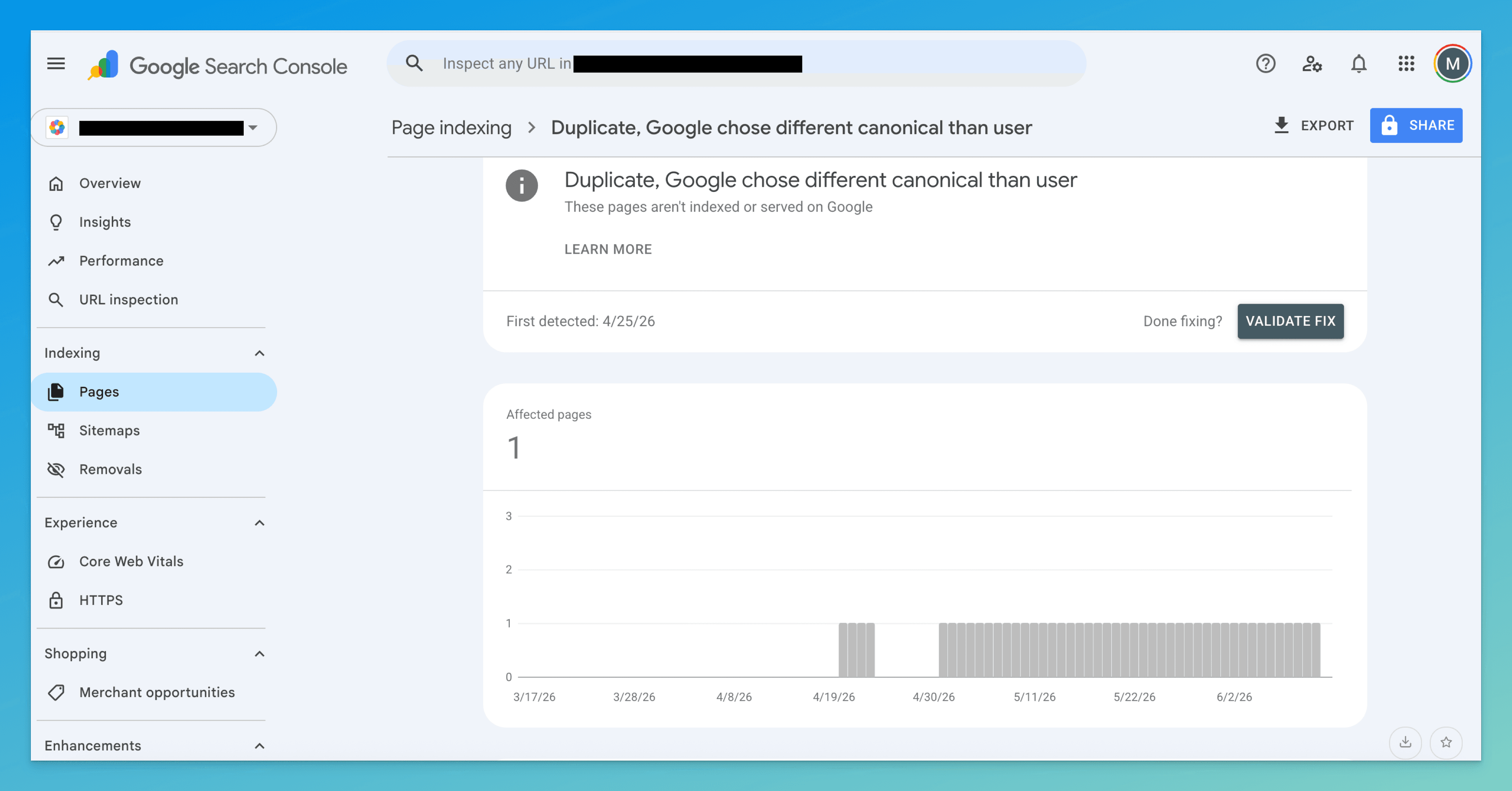
Google re-evaluates canonicals continuously. Even after you align everything, the selected canonical can lag your fix by days to a couple of weeks — it updates on the next crawl-and-assess cycle, not the moment you ship.
Why Google overrode your tag (find your cause)
A canonical tag is one vote. Google counts the others — internal links, sitemap, redirects, content, the target's own health — and goes with the majority. Run your A-vs-B pair against these four, in order. The first match is almost always why your tag was ignored.
1. Your other signals contradict the tag
Your rel=canonical says URL A, but your internal links, your sitemap entry, your hreflang, and your redirects mostly resolve to URL B. Google trusts the aggregate of what your site does over the one line that says what you want. If 40 internal links and your sitemap point at B and only the tag points at A, B wins — Google reads the lone tag as the misconfiguration.
Tell: click around your own site and follow the sitemap; you keep landing on B, not the URL you tagged as canonical.
2. The page you tagged is weaker than the one Google picked
If URL A is thinner, slower, or less linked than URL B, Google quietly upgrades to the better page. Canonical consolidation is supposed to point at the strongest version, and Google will second-guess you when your declared canonical clearly isn't it.
Tell: put A and B side by side — B has more content, more inbound links, or a cleaner URL, and A is the lighter one.
3. The canonical target is broken in some way
Google won't crown a target it can't fully trust. If URL A returns anything other than a clean 200 — it redirects, 404s, is noindex, or is blocked in robots.txt — Google declines the tag and falls back to a target it can actually index.
Tell: load URL A directly and check it in URL Inspection — it redirects elsewhere, isn't 200 OK, carries a noindex, or is disallowed.
4. The two pages aren't actually identical
Canonical is for duplicates. If A and B are near duplicates with meaningfully different content, Google may decide they're two separate pages and refuse to fold one into the other — so it indexes each on its own merits and ignores the tag.
Tell: A and B share a template but differ in real content (different body copy, different products, different intent), not just a swapped parameter.
How to fix it
Match the fix to the cause above — you rarely need all of these. Every one of them is really the same move: make your declared canonical the obvious choice by aligning the signals that contradicted it.
- Point every signal at the same URL
For contradicting signals (cause 1): pick your intended canonical and make everything resolve to it. Internal links — nav, footer, body, templated links — should use that exact URL, not parameter or alternate-domain versions. Your sitemap should list only it.
hreflangentries should reference it. Any redirect chain should land on it directly. Internal linking is the heaviest of these, so start there: the URL you declare canonical should be the one your own site links to most. - Make the declared canonical the strongest version
For a weaker target (cause 2): either strengthen URL A until it genuinely beats B — fuller content, the inbound links, the cleaner address — or accept Google's read and re-declare B as the canonical. Don't tag a page as canonical that you wouldn't want to win on its own. If B is simply the better page, switching your tag to B is the faster fix.
- Fix the canonical target itself
For a broken target (cause 3): the target must be a directly reachable, indexable page. Make URL A return
200 OK, remove anynoindexandrobots.txtblock on it, and eliminate redirects on the target so the tag points at the final URL — never at a hop. Google honors a clean target far more readily than a compromised one. - Consolidate or differentiate near-duplicates
For not-quite-identical pages (cause 4): decide whether they should be one page or two. If they're really the same intent, merge them and
301the loser to the winner — a redirect is a much stronger signal than a tag. If they each deserve to exist, differentiate them clearly (distinct content, audience, target query) and drop the cross-canonical, since they aren't duplicates.
How to know it worked
Give Google a crawl cycle — days to a couple of weeks — then re-check, in order of reliability:
- URL Inspection — re-inspect URL A. User-declared and Google-selected canonical now reading the same URL is the definitive confirmation.
- Performance report — filter to the canonical URL. Impressions and clicks consolidating onto it (and draining from the alternate) is the real-world proof signals merged.
site:search —site:yourdomain.com/your-page-url. A quick sanity check, but trust URL Inspection over it.
If the two canonical fields still disagree after a couple of weeks, you aligned the wrong signal. Go back to the four causes — most often a templated internal link or a stray sitemap entry is still pointing at B.
Don't confuse it with these neighbors
| Status | What it really means | Fix lives at |
|---|---|---|
| Google chose different canonical than user | You declared a canonical — Google overrode it | This page |
| Duplicate without user-selected canonical | You declared no canonical, so Google chose for you | Duplicate canonical guide |
| Alternate page with proper canonical tag | You declared a canonical and Google honored it | Alternate page guide |
| Crawled – currently not indexed | Google read the page and judged it not worth indexing — not a canonical call | Crawled not indexed guide |
The line that sets this apart: you gave Google a canonical, and it disagreed — so the fix is winning the argument with aligned signals, not adding a tag.
The slow part isn't the fix — it's inspecting every affected page to see which canonical Google picked, then tracing which signal (a link, the sitemap, a redirect, the content) is pulling it toward the wrong URL.
TurboConsole reads your Search Console data, flags every page where Google overrode your canonical, shows the URL it chose instead, and points at the conflicting signal — so you go straight to aligning it instead of auditing one URL at a time.
Frequently asked
Why does Google ignore my canonical tag?
How do I see which canonical Google chose?
Should I just change my canonical to match what Google picked?
How is this different from “Duplicate without user-selected canonical”?
We surface these issues automatically.
Connect Search Console once. Every issue like this gets ranked by impact, with a fix you can ship today.
Related issues
- Duplicate Without User-Selected Canonical: What It Means + How to Fix It“Duplicate without user-selected canonical” in Google Search Console means Google found duplicate pages and picked one for you. Here's why — and exactly how to fix it.
- Alternate Page with Proper Canonical Tag (GSC): What It Means + How to Fix It“Alternate page with proper canonical tag” in Google Search Console means Google chose a different version to index. Here's when it's fine, when it's a problem, and how to fix it.
- Crawled – Currently Not Indexed: What It Means + How to Fix It“Crawled – currently not indexed” in Google Search Console means Google saw your page but chose not to index it. Here's why it happens and exactly how to fix it.